

멀티모달#
LLM을 사용하여 이미지와 오디오를 처리하는 방법을 학습합니다.
시각#
vision 기능을 통해 모델이 이미지를 입력받고 이에 대한 질문에 답변하도록 할 수 있습니다. Xinference에서는 이는 특정 모델이 Chat API를 통해 대화할 때 이미지 입력을 처리할 수 있음을 의미합니다.
지원되는 모델 목록#
Xinference에서 vision 기능을 지원하는 모델은 다음과 같습니다:
qwen-vl-chat
deepseek-vl-chat
omnilmm
cogvlm2
MiniCPM-Llama3-V 2.5
glm-edge-v
빠른 시작#
모델은 두 가지 주요 방식으로 이미지를 가져올 수 있습니다: 이미지 링크를 전달하거나 요청에 base64로 인코딩된 이미지를 직접 전달하는 방식입니다.
OpenAI 클라이언트 사용 예시#
import openai

client = openai.Client(
    api_key="cannot be empty",
    base_url=f"http://<XINFERENCE_HOST>:<XINFERENCE_PORT>/v1"
)
response = client.chat.completions.create(
    model="<MODEL_UID>",
    messages=[
        {
            "role": "user",
            "content": [
                {"type": "text", "text": "What’s in this image?"},
                {
                    "type": "image_url",
                    "image_url": {
                        "url": "http://i.epochtimes.com/assets/uploads/2020/07/shutterstock_675595789-600x400.jpg",
                    },
                },
            ],
        }
    ],
)
print(response.choices[0])
Base64로 인코딩된 이미지 업로드#
import openai
import base64

# Function to encode the image
def encode_image(image_path):
with open(image_path, "rb") as image_file:
    return base64.b64encode(image_file.read()).decode('utf-8')

# Path to your image
image_path = "path_to_your_image.jpg"

# Getting the base64 string
b64_img = encode_image(image_path)

client = openai.Client(
    api_key="cannot be empty",
    base_url=f"http://<XINFERENCE_HOST>:<XINFERENCE_PORT>/v1"
)
response = client.chat.completions.create(
    model="<MODEL_UID>",
    messages=[
        {
            "role": "user",
            "content": [
                {"type": "text", "text": "What’s in this image?"},
                {
                    "type": "image_url",
                    "image_url": {
                        "url": f"data:image/jpeg;base64,{b64_img}",
                    },
                },
            ],
        }
    ],
)
print(response.choices[0])
각 대화 턴에서 이미지 수 제한#
VLLM 백엔드를 사용하는 비전 모델의 경우, limit_mm_per_prompt 매개변수를 통해 각 대화에서 처리할 수 있는 이미지 수를 제한할 수 있습니다. 이는 메모리 사용을 제어하고 성능을 향상시키는 데 도움이 됩니다.
# Launch model with image count limitation using Python client
from xinference.client import Client

client = Client("http://<XINFERENCE_HOST>:<XINFERENCE_PORT>")

# Launch model and set maximum 4 images per conversation turn
model_uid = client.launch_model(
    model_name="qwen2.5-vl-instruct",
    model_engine="vLLM",
    model_format="pytorch",
    quantization="none",
    model_size_in_billions=3,
    limit_mm_per_prompt="{\"image\": 4}"
)
또는 명령줄을 사용하여 모델을 시작할 수 있습니다:
# Launch model with image count limitation using CLI
xinference launch \
    --model-engine vLLM \
    --model-name qwen2.5-vl-instruct \
    --size-in-billions 3 \
    --model-format pytorch \
    --quantization none \
    --limit_mm_per_prompt "{\"image\":4}"
Web UI의 경우, vLLM 엔진 양식에서 limit_mm_per_prompt 매개변수를 설정할 수 있습니다:
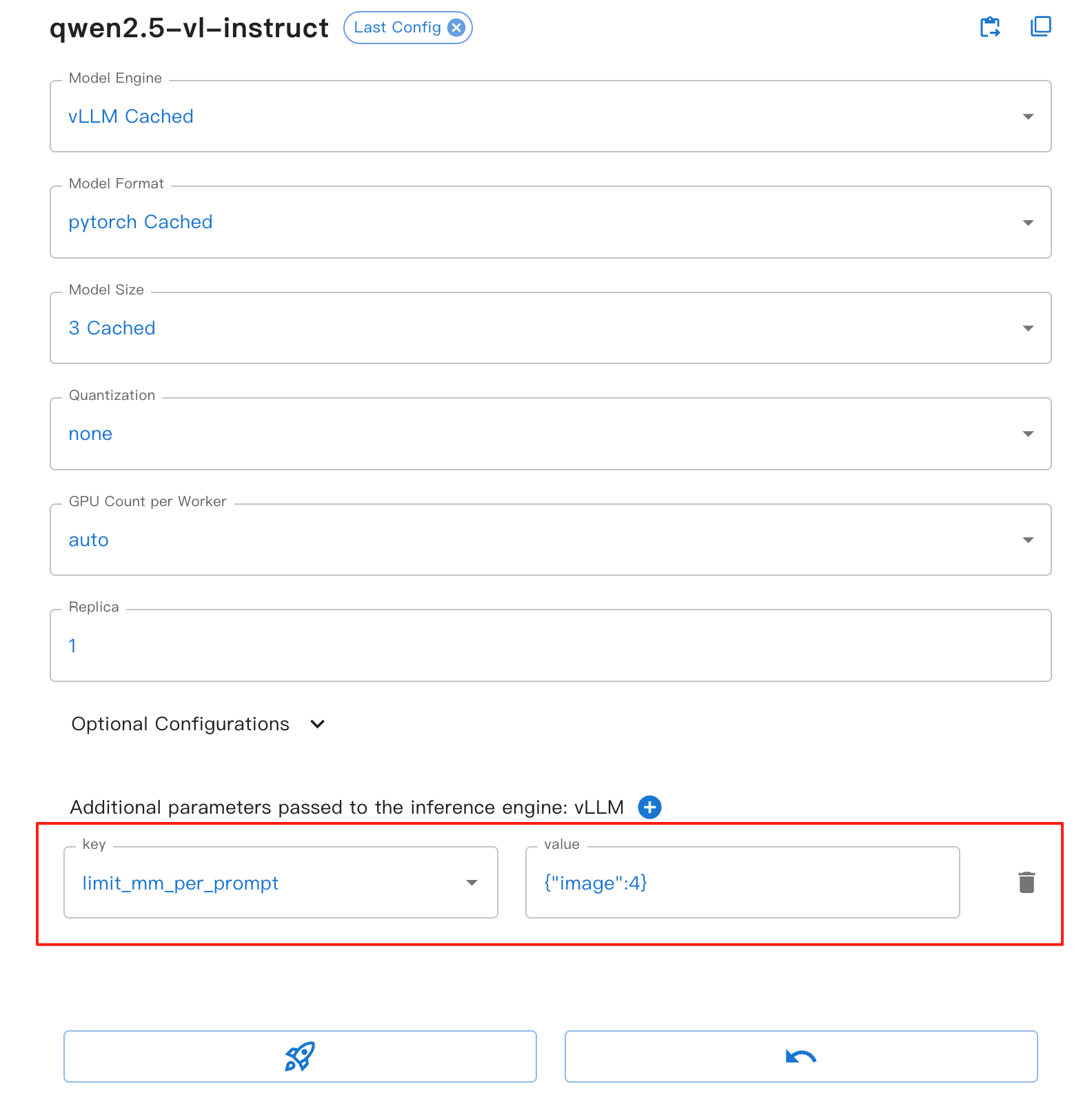
이 매개변수는 다음과 같은 이점을 제공합니다:
image: 각 대화 라운드에서 허용되는 최대 이미지 수를 설정합니다
메모리 오버플로를 방지하는 데 도움이 되며, 특히 여러 이미지를 처리할 때 유용합니다.
모델 추론의 안정성과 성능 향상
VLLM 기반의 모든 비전 모델에 적용됩니다.
참고
limit_mm_per_prompt 매개변수는 VLLM 백엔드를 사용할 때만 적용됩니다. 모델이 다른 백엔드를 사용하는 경우 이 매개변수는 무시됩니다.
튜토리얼 노트북에서 vision 능력에 대한 더 많은 예제를 찾을 수 있습니다.
qwen-vl-chat의 예시를 사용하여 LLM의 시각적 능력을 학습하는 방법
음성#
“오디오” 기능을 통해 모델은 오디오를 수신하여 오디오 분석을 수행하거나 음성 명령에 따라 직접 텍스트 응답을 생성할 수 있습니다. Xinference에서 이는 일부 모델이 Chat API를 통해 대화할 때 오디오 입력을 처리할 수 있음을 의미합니다.
지원되는 모델 목록#
Xinference에서 “오디오” 기능은 다음 모델을 지원합니다:
빠른 시작#
오디오는 모델에 두 가지 주요 방식으로 제공될 수 있습니다: 이미지 링크를 전달하거나 요청에 오디오 URL을 직접 전달하는 방식입니다.
오디오가 포함된 채팅#
from xinference.client import Client

client = Client("http://<XINFERENCE_HOST>:<XINFERENCE_PORT>")
model = client.get_model(<MODEL_UID>)

messages = [
    {"role": "system", "content": "You are a helpful assistant."},
    {
        "role": "user",
        "content": [
            {
                "type": "audio",
                "audio_url": "https://qianwen-res.oss-cn-beijing.aliyuncs.com/Qwen2-Audio/audio/glass-breaking-151256.mp3",
            },
            {"type": "text", "text": "What's that sound?"},
        ],
    },
    {"role": "assistant", "content": "It is the sound of glass shattering."},
    {
        "role": "user",
        "content": [
            {"type": "text", "text": "What can you do when you hear that?"},
        ],
    },
    {
        "role": "assistant",
        "content": "Stay alert and cautious, and check if anyone is hurt or if there is any damage to property.",
    },
    {
        "role": "user",
        "content": [
            {
                "type": "audio",
                "audio_url": "https://qianwen-res.oss-cn-beijing.aliyuncs.com/Qwen2-Audio/audio/1272-128104-0000.flac",
            },
            {"type": "text", "text": "What does the person say?"},
        ],
    },
]
print(model.chat(messages))